


























GoldenRoo Casino App for Android and iOS in Australia
This casino is perfectly optimised for mobile use, allowing both Android and iOS users to experience the same casino experience as provided by the website’s desktop version. A user-oriented responsive design makes navigating the mobile version easy and quick, with constant access to important pages such as game selection, promotions, searching, and depositing.

Despite the vast amount of content on display and on offer, the mobile version of the website is quite concise, meaning that GoldenRoo has worked hard on minimising the inconvenience of switching from browsing to account management and back to playing the games.
What Is PWA?
Unlike casinos which have downloadable applications, this one uses a PWA. A PWA refers to a Progressive Web App, essentially a website that is optimised to perform like an application.
While the regular version of the website needs to be opened within the browser, the PWA version can be added to the phone’s home screen and then accessed in app-like mode without a URL bar. In addition to the above, the PWA version can cache selected resources of the website to possibly increase the speed of future access.
The only difference between the PWA and a stand-alone mobile app is that the latter needs to be downloaded from the respective app store. Also, in most cases, native apps are more powerful, as they have access to more smartphone functions. At the same time, it requires additional installation, storage space, and user-side updates.
When it comes to Golden Roo, the first-ever PWA launch through 4G takes about 5.4 seconds in Sydney. While the PWA would not make the first load faster, it can reduce loading times on the next visits.
Mobile Casino Play
By “installing” the progressive Golden Roo casino app on your mobile phone, you have instant access to the casino through your home screen. Though the installation procedure varies for Android and iOS, there is no need to download any software from any online store.
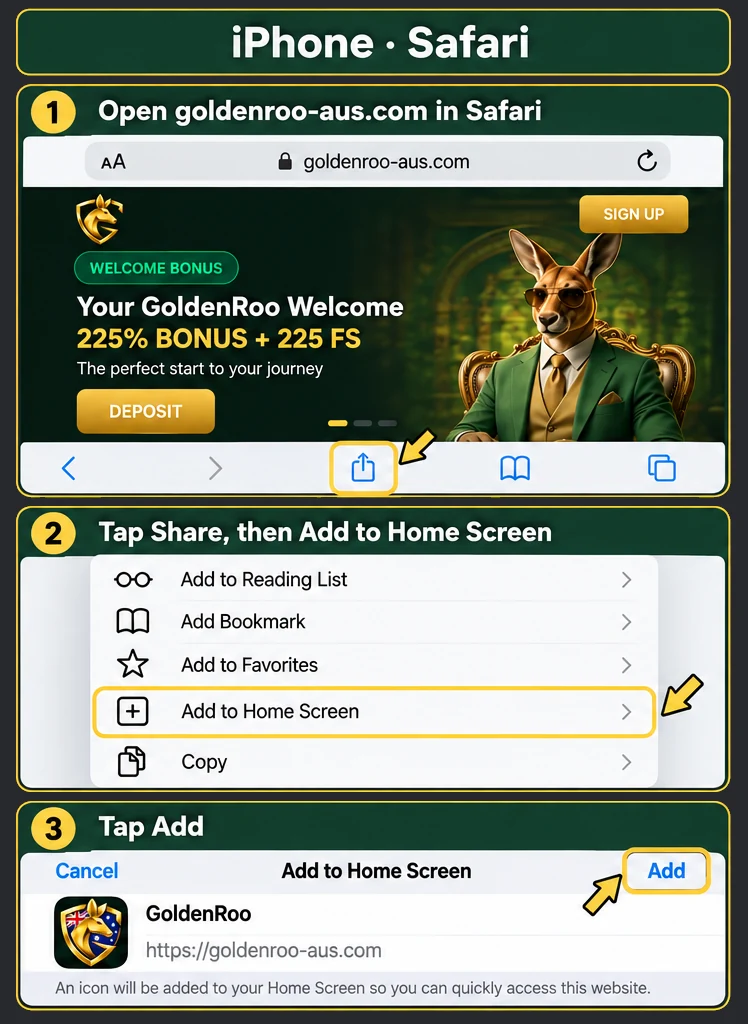
Adding PWA on Apple Devices
The process of installing a PWA on the iPhone or iPad can be done entirely through Safari:
- Visit the official Golden Roo site with the standard browser.
- Then select the Share button located in the lower right-hand corner of your screen.
- After that, select Add to Home Screen.
- Please make sure that the name and the icon are correct, then click Add.
- Look for the GoldenRoo icon on your home screen.
- Tap it to open the PWA in a standalone app-like window.
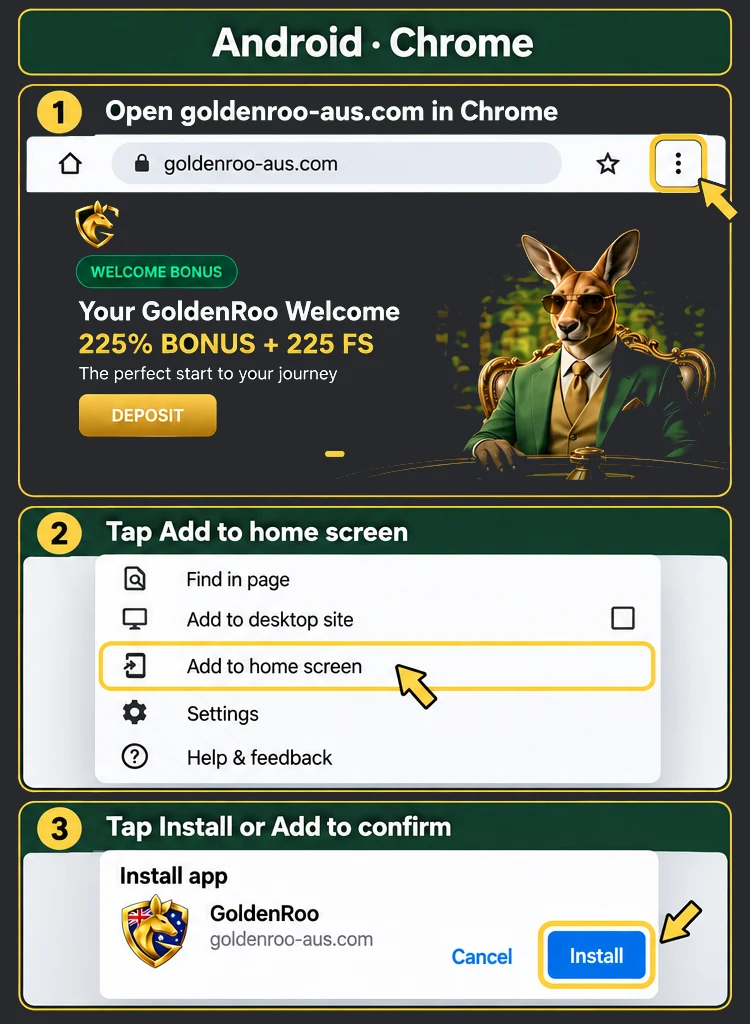
How to Install PWA on Android
For Android, Google Chrome will know instantly whether the PWA fits your device and give you the option of installing it from the menu bar as follows:
- Access GoldenRo using Google Chrome from your Android device.
- Tap the three-dot icon in the upper-right corner.
- Tap Install app/Add to Home screen.
- Tap OK to then see a new icon on your homescreen.
- Use it to launch the PWA.
GoldenRoo Mobile Login
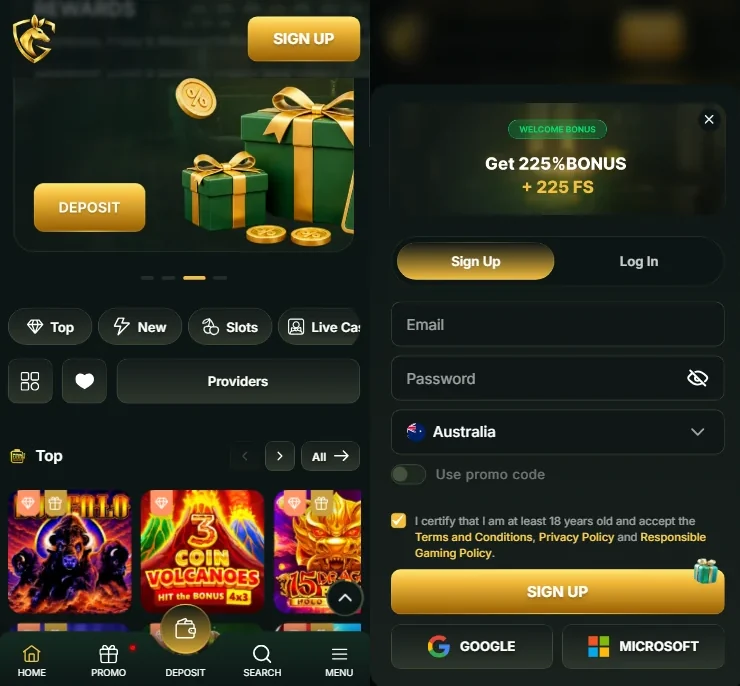
The same way GoldenRoo app download for Android or iOS is not required, it doesn’t ask you to create a separate account for mobile play.
Any Aussie player will be able to use the same account on desktop and mobile; there will be no need to register a new one or sign up again when switching from one mobile device to another. It’s especially useful if you have an account that is already verified, and wish to continue playing from your mobile device.
Logging in on mobile is fairly simple. Press Log In and key in the email and password that were used to sign up. If you wish, the remember-me function will save your credentials, which will make logging in easier in the future. Alternatively, logging in with a Google or Microsoft account is possible and, possibly, easier when you can link up the apps. There is a possibility to recover the password if needed using the user’s registered email address.
This means that you will be able to register yourself on a PC for the first time and use the same login credentials when logging into the mobile device.
GoldenRoo Interface on Andorid and iOS
On mobile, the platform retains its recognisable combination of dark green and black interface colours that have gold accents. The structure has been altered to make mobile browsing easier. The bottom navigation bar can lead to Home, Promo, Deposit, Search, and Menu tabs.
The first screen you see after booting up the GoldenRoo official app shows a welcome bonus and games sorted by categories, and there are also filters for Top, New, Slots, and Live Casino, as well as provider selection that help navigate through the catalogue.
The game section is visually leaning, with large preview pictures for each game and horizontal category browsing. When clicking on any of the games, a pop-up window will appear with the name of the game, its provider, and options to play the game for real or play a demo version. The deposit function is also persistent.
The expanded menu contains additional features such as account balance and Messages, after which there are specific pages for Promo, VIP, Missions and Tournaments. There is also access to Top, New and Slots, Live Chat and language selection. In general, the mobile website is able to condense all features into quite a small interface.
Mobile Troubleshooting
Due to what is the GoldenRoo app, all issues are surface-level and are likely to be caused by the browser, connection, or device rather than the software itself. Several quick checks may help solve most challenges before reaching out to customer support:
| Problem | Fix |
| Slow loading | Make sure your phone’s web connection is stable and switch between Wi-Fi and mobile. Close all unnecessary applications and refresh the page. |
| Site does not load at all | Refresh the page and ensure that your browser is up to date. In case the problem still persists, try to open Golden Roo in another browser. |
| Cannot log in to account | Ensure that you are entering the correct email address and password. In case you forget your password, choose the “Forgot your password?” option and reset it. |
| A game freezes or does not open | Refresh the page and open the game again. Closing all browser windows will also help to free up some space on your device. |
| PWA does not work | Close the PWA app fully and open it again. In case the problem still exists, then open GoldenRoo directly in your browser. |
| Deposits don’t work | Refresh the page and try again. Make sure there aren’t any ongoing verification issues. |